GD&T · Lesson 1 of 4 · ~13 min read
Reading engineering drawings
Learning outcomes
- You’ll be able to find the part number, revision, material, units and default tolerances in a title block in under a minute.
- You’ll be able to tell first-angle from third-angle projection by the symbol, and name every view on a three-view drawing.
- You’ll be able to work out the min and max of a dimension and say where its tolerance comes from: its own callout, the title block, or nowhere (reference).
Prerequisites: None.
Example part used in this lesson: AH-101 mounting bracket (fictional). All values are decimal inches.
| Feature | Value on drawing | Tolerance source |
|---|---|---|
| Base length | 3.00 | Title block, .XX = ±.01 (fictional) |
| Width (depth) | 2.00 | Title block, .XX = ±.01 |
| Overall height | 1.50 | Title block, .XX = ±.01 |
| Plate thickness (base and upright) | .250 | Title block, .XXX = ±.005 |
| Inner height of upright | (1.25) | None: reference dimension |
| Holes, 2X | Ø.257 ±.003 THRU | Its own tolerance |
| Hole positions | 1.25 from the upright’s outer face to the first hole; (2.50) to the second, reference; both centered on the 2.00 width (1.00) | Title block, .XX = ±.01 (first hole and 1.00 only) |
| Hole spacing | 1.25 | Title block, .XX = ±.01 |
| Material | Aluminum alloy 6061-T6 | Note 2 |
AH-101 is an L-shape: a flat base 3.00 long, with an upright leg standing at its left end. The two holes go through the base.
What it is
An engineering drawing is the formal definition of a part: the geometry it must have, how far each feature may vary, and what it is made of. A drawing plus the specs it calls out is what a shop quotes against and what inspection accepts or rejects. In many companies, the drawing carries authority and the 3D model is just for reference. Others use model-based definition, where the annotated 3D model is the authority. Check which one your employer uses.
The computer-aided design (CAD) model shows the ideal shape. The drawing adds what the model alone doesn’t: how accurate each feature has to be. Later lessons add geometric dimensioning and tolerancing (GD&T), a symbol language for tolerancing by function. This lesson covers the plain drawing underneath it, built from five things:
- Orthographic views: flat views looking straight at the part from the front, top and side, lined up with each other. On AH-101, the front view shows the L-profile.
- Title block: the labeled table in the lower-right corner that identifies the drawing (part number, revision, material, units, default tolerances).
- Dimension: a number that sets a size or location, such as the 3.00 base length.
- Tolerance: how far the real part may be from that number. The Ø.257 ±.003 hole may measure anywhere from .254 to .260.
- Note: a sentence that adds requirements, such as material or finish. A general note applies everywhere. A flag note applies only where its numbered flag points. Real finish notes usually cite a published finish spec; AH-101’s are kept generic.
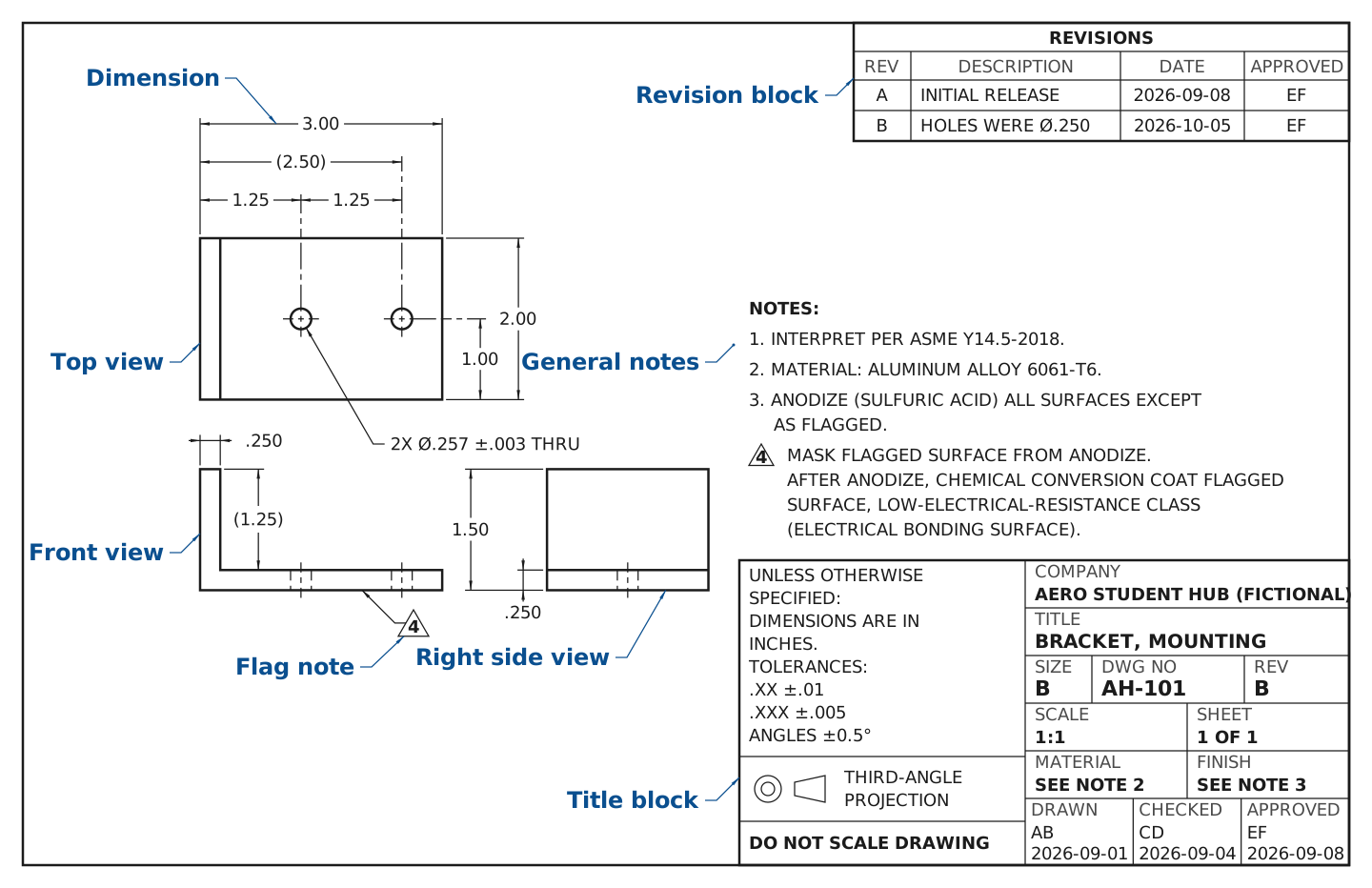
Long description
The full AH-101 drawing sheet, Rev B, on a B-size landscape sheet in third-angle projection. The front view sits at lower left and shows the L-profile, with the upright at the left end. Two pairs of thin dashed hidden lines cross the base, one pair for each hole, each with a centerline. The front view also carries the .250 upright thickness, the (1.25) inner height of the upright, and flag 4 pointing to the bottom edge of the base. The top view sits directly above it: a 3.00 by 2.00 rectangle with a line at the upright's inner face and two Ø.257 hole circles. Its dimensions are 3.00 overall, 1.25 to the first hole, 1.25 hole spacing and (2.50) to the second hole as a reference. It also shows 1.00 from the front edge to the holes and 2.00 overall depth. The hole callout reads 2X Ø.257 ±.003 THRU. The right side view sits to the right of the front view and is 2.00 wide and 1.50 tall, with a line at the top of the base. It shows one pair of hidden lines, because the two holes line up in this view, plus the 1.50 height and the .250 base thickness. Notes 1 to 4 sit above the title block, and Note 4 carries the same flag 4 triangle. The title block at lower right names the company, AERO STUDENT HUB (FICTIONAL). It also gives the part number AH-101, revision B, sheet 1 of 1, scale 1:1, and the material and finish notes. Its tolerance block reads DIMENSIONS ARE IN INCHES, .XX ±.01, .XXX ±.005 and ANGLES ±0.5°, beside the third-angle symbol and DO NOT SCALE DRAWING. The revision block at upper right lists A, INITIAL RELEASE, and B, HOLES WERE Ø.250. Eight labels name the title block, the front, top and right side views, one dimension, the general notes, the flag note and the revision block.
Lettering in this figure is Noto Sans, under the SIL Open Font License.
Where you’ll see it on the job
- A manufacturing intern at receiving inspection measures a supplier’s first parts against the drawing. Every measurement needs limits, and those come from the dimensions plus the title block.
- A design intern preparing a change writes up what moved, so the revision block shows the new revision letter and a one-line description.
- An intern on the machine shop floor gets asked by a machinist whether a dimension in parentheses has to be held. (It doesn’t. You’ll see why in Step 5.)
- A test or integration engineer checks a flag note to see which surface is masked from anodize and chem-filmed instead, so the bracket can be electrically bonded to structure.
- In interviews, you might be handed a print and asked what you can tell about the part. Being able to walk the title block and views out loud is a quick way to show you’ve worked with real hardware.
Step-by-step how-to
Use these seven steps, in order, on every new drawing.
- Read the title block. Find the part number, revision, material, sheet count (“1 OF 2” means another sheet exists) and the tolerance block. That block is usually headed “UNLESS OTHERWISE SPECIFIED” and lists defaults by decimal places.
- Confirm the units. Look for a note such as “DIMENSIONS ARE IN INCHES”. On dual-dimensioned drawings, the second unit sits in square brackets, like 3.00 [76.2]. Some drawings stack the second unit above or below instead, so check your company’s drafting manual.
- Check the projection symbol. It’s a small cone drawn two ways (Figure 1.3). In third-angle projection (the US default), each view sits on the side you looked from: the top view goes above the front view, the right view goes to its right. In first-angle projection (used across most of Europe and Asia), they swap: the top view goes below the front view and the right view goes to its left. In the symbol, if the narrow end of the trapezoid points toward the circles, it’s third-angle. If it points away, it’s first-angle. Circle placement can vary, so trust the narrow end.
- Name the views and read the lines. Find the front view first (usually the one with the most shape), then line features up between views. Thick solid lines are visible edges, thin dashes are hidden edges, and thin long-short lines are centerlines (Figure 1.2). A section view shows the part cut open along a labeled cutting-plane line (for example, SECTION A-A). A detail view is a labeled zoom-in, often at a different scale.
- Find the tolerance on each dimension. If a dimension has its own tolerance, use it. If not, count the decimal places and use that line of the tolerance block. A value in parentheses is a reference dimension: information only, not inspected. A value in a rectangle is a basic dimension. It gets its tolerance from a feature control frame (FCF), not the title block. An FCF is a boxed callout that holds a geometric tolerance symbol, its value and its datum letters (Lesson 3). The basic dimension says where the tolerance zone sits; the FCF says how big it is.
- Read the notes, then the flags. General notes apply to the whole part. A flag note (a number in a triangle) applies only where its flag points. The title-block scale says how the views were drawn, not how to measure: under “DO NOT SCALE DRAWING”, never measure the paper for a missing size. Ask instead.
- Check the revision. The title-block revision should match the latest line in the revision block and the revision on your work order. If not, stop and ask before you measure or make anything.
Figure placeholder Figure 1.2 (drawing coming soon)
What it will show: Line-type legend, six rows. Each row: a 120 px line sample, then its name, then what it means on AH-101. Rows: thick solid "Visible line: an edge you can see"; thin dashed "Hidden line: an edge behind material (AH-101 holes in the front view)"; thin long-short "Centerline: axis of a hole"; thin solid with arrowheads and the value 3.00 "Dimension line"; thin solid short lines leaving the part "Extension line"; thick long-short-short with arrows and letters A "Cutting-plane line (section view)".
Planned alt text: A legend of six line types, each with a sample and a plain-language meaning. Notice that thickness and dash pattern, not color, tell the line types apart.
Figure placeholder Figure 1.3 (drawing coming soon)
What it will show: First-angle vs third-angle, side by side. Same simple part in both panels: a 2.00 x 1.00 x 1.00 block with a 0.50 x 0.50 notch running front-to-back along the top-right edge, so it shows as a notch in the front view and as a visible line in the top and side views. Left panel "THIRD-ANGLE (US default)": front view center, top view above, right side view to the right; third-angle symbol beneath (two concentric circles on the left, trapezoid on the right with its narrow end pointing left, toward the circles). Right panel "FIRST-ANGLE (most of Europe and Asia)": front view center, top view below, view from the right placed to the left; first-angle symbol beneath (trapezoid on the left with its narrow end pointing left, away from the circles; two concentric circles on the right). Accent color on the notch in every view. Panel caption: "Same part, same views, different positions."
Planned alt text: Two layouts of the same notched block. Notice that the top view is above the front view in third-angle and below it in first-angle, and that in the cone symbol the narrow end points toward the circles for third-angle and away from them for first-angle.
Worked examples
All three examples use Figure 1.1 and decimal inches. The title block reads: TOLERANCES UNLESS OTHERWISE SPECIFIED: .XX ±.01, .XXX ±.005, ANGLES ±0.5°. THIRD-ANGLE PROJECTION. REV B.
Example 1: Pull the basics from the title block
Given: The AH-101 drawing (Figure 1.1, title block in Figure 1.4).
- Read the title block: Part number AH-101, revision B, sheet 1 of 1. The material box points to Note 2: “MATERIAL: ALUMINUM ALLOY 6061-T6”.
- Confirm the units: The block says “DIMENSIONS ARE IN INCHES”. No square-bracket values appear, so this drawing isn’t dual-dimensioned.
- Find the tolerance on each dimension: A two-place value like 2.00 uses the .XX line.
Answer: Material is 6061-T6 aluminum, units are inches, and a two-place dimension carries ±.01 in.
Scroll → to see the whole figure
Long description
Close-up of the AH-101 notes, title block and revision block, cropped from the Figure 1.1 sheet and laid out as in the drawing spec. The title block is about 7.6 x 3.8 in and sits at the bottom of the figure. The notes sit directly above it, left-aligned with its left edge: 1. INTERPRET PER ASME Y14.5-2018. 2. MATERIAL: ALUMINUM ALLOY 6061-T6. 3. ANODIZE (SULFURIC ACID) ALL SURFACES EXCEPT AS FLAGGED. 4 (in triangle). MASK FLAGGED SURFACE FROM ANODIZE. AFTER ANODIZE, CHEMICAL CONVERSION COAT FLAGGED SURFACE, LOW-ELECTRICAL-RESISTANCE CLASS (ELECTRICAL BONDING SURFACE). The title block's left column holds the tolerance block: UNLESS OTHERWISE SPECIFIED: DIMENSIONS ARE IN INCHES. TOLERANCES: .XX ±.01 .XXX ±.005 ANGLES ±0.5°. Below it sit the third-angle projection symbol with the words THIRD-ANGLE PROJECTION, then DO NOT SCALE DRAWING. The right column holds COMPANY AERO STUDENT HUB (FICTIONAL); TITLE BRACKET, MOUNTING; SIZE B; DWG NO AH-101; and REV B. Next come SCALE 1:1, SHEET 1 OF 1, MATERIAL SEE NOTE 2 and FINISH SEE NOTE 3. Its bottom row reads DRAWN AB 2026-09-01, CHECKED CD 2026-09-04, APPROVED EF 2026-09-08. The revision block, which sits at the sheet's upper right, is shown above the notes as a separate strip marked as moved for the close-up. It has columns REV, DESCRIPTION, DATE and APPROVED, with rows A, INITIAL RELEASE, 2026-09-08, EF and B, HOLES WERE Ø.250, 2026-10-05, EF. Accent-color callouts label each field.
Lettering in this figure is Noto Sans, under the SIL Open Font License.
Example 2: Explain the dashed lines in the front view
Given: The front view shows two pairs of thin dashed vertical lines running through the base, from its top surface to its bottom surface.
- Check the projection symbol: Narrow end toward the circles, so it’s third-angle. The top view is directly above the front view.
- Name the views and read the lines: Draw a vertical line up from each dashed pair (Figure 1.1b). They land on the two circles in the top view, 1.25 in and (2.50) in from the left edge. The dashes are .257 in apart, the same as the hole diameter. Dashed means hidden. In the front view you look along the base’s 2.00 in depth. Each hole is centered 1.00 in back, so solid aluminum sits between you and the hole.
Answer: The dashed pairs are the two Ø.257 through holes, seen side-on. They’re hidden because about 0.87 in of aluminum (1.00 − .1285, the hole’s radius) sits between you and each hole.
Scroll → to see the whole figure
Long description
Front view at lower left, top view directly above it, right side view to the right. The dashed lines in the base line up with the two hole circles in the top view.
Lettering in this figure is Noto Sans, under the SIL Open Font License.
Example 3: Find the limits on the hole spacing, and judge one part
Given: The 1.25 dimension between hole centers has no tolerance beside it. An inspector measures one part at 1.262 in. The hole callout reads “2X Ø.257 ±.003 THRU”.
- Read the title block: Defaults are .XX ±.01 and .XXX ±.005.
- Find the tolerance on each dimension: 1.25 has two decimal places, so ±.01 applies.
- Min spacing = 1.25 − 0.01 = 1.24 in
- Max spacing = 1.25 + 0.01 = 1.26 in
- Find the tolerance on each dimension (continued): The hole diameter has its own tolerance, which overrides the block. Its limits are .257 − .003 = .254 in and .257 + .003 = .260 in.
Answer: Allowed spacing is 1.24 to 1.26 in. The part measures 1.262 in, which is 0.002 in over, so it fails. Allowed hole size is .254 to .260 in. Report it as a nonconformance (a part that doesn’t meet a stated requirement), usually on a nonconformance report (NCR). Don’t round the measurement to 1.26 to make it pass.
Easy mistakes
Assuming the projection method
US students expect third-angle, so a first-angle print gets read with top and bottom swapped. Check the symbol before you name any view.
Treating a hidden line as a visible edge
Dashes are easy to miss on a busy print. Before you call something an edge, ask whether it’s solid or dashed and find it in another view.
Forgetting the default tolerance applies
A bare number looks exact, so people treat 1.25 as “1.25 exactly” or “any value near it”. Every untoleranced dimension takes the title-block default unless it’s in parentheses, in a box, marked MIN or MAX, or covered by a note. Trailing zeros count too: on inch drawings, 2.5, 2.50 and 2.500 can carry three different tolerances, so never retype a value with different decimals.
Working from an old revision
Old prints sit in folders and inboxes for years. Match the revision on the drawing to your work order before you start.
Mixing up general and flagged notes
A flag note tucked in the notes list looks like it applies everywhere. If it has a triangle, find where the flag points, and apply it only there.
Measuring along a different dimension chain
It’s tempting to check the second hole against (2.50) from the upright’s outer face. That’s reference only. The requirement is the 1.25 center-to-center spacing, so judge the part on that, however you measure it. If two toleranced dimensions cover the same distance, both apply: flag the drawing to the design engineer.
Practice questions with answers
Use Figure 1.1 and Figure 1.4 unless a question says otherwise.
Q1. Which revision is shown, and what changed in it?
Show answer
Answer: Revision B. The holes were Ø.250 and are now Ø.257.
Why: The REV box says B, and the revision block’s latest line describes the change.
Review: Step 7
Q2. On a third-angle drawing, which view sits directly to the right of the front view?
A) Left side view
B) Right side view
C) Top view
D) Bottom view
Show answer
Answer: B) Right side view
Why: Third-angle puts each view on the side you looked from (Figure 1.1b). A) is tempting because first-angle puts the view from the left on the right.
Q3. What is the maximum allowed base length?
A) 3.00 in
B) 3.005 in
C) 3.01 in
D) 3.10 in
Show answer
Answer: C) 3.01 in
Why: 3.00 has two decimals, so it takes ±.01: 3.00 + 0.01 = 3.01 in. B) is tempting, but ±.005 is the three-place default.
Review: Example 3
Q4. What tolerance does inspection apply to the (1.25) inner height of the upright?
Show answer
Answer: None. It is a reference dimension and isn’t inspected.
Why: It’s derived from 1.50 − .250, and those two dimensions carry the tolerances. Parentheses mark it as for information only.
Review: Step 5
Q5. A supplier sends a print with the first-angle symbol. Where will you find the top view?
Show answer
Answer: Directly below the front view.
Why: First-angle places each view on the opposite side from where you looked, so the view from above lands underneath.
Review: Step 3
Q6. A hole center may be off by ±.01 in X and ±.01 in Y. What is the largest total distance it can sit from its nominal spot and still pass?
A) 0.010 in
B) 0.014 in
C) 0.020 in
D) 0.028 in
Show answer
Answer: B) 0.014 in
Why: The worst case is the corner of the square zone: in. A) is tempting, but that’s only the limit straight along X or Y.
Review: FAQs
Q7. A supplier’s part matches the CAD model but not Note 4 (the flagged bonding face is anodized instead of chem-filmed). Do you accept it?
Show answer
Answer: No, not on your own call. Hold the part and raise it with the responsible engineer or quality lead.
Why: On a drawing-based program, the drawing’s notes are requirements and the model doesn’t show finish. Anodize is an electrical insulator, so an anodized bonding face can’t do its job. Who decides whether to use the part as-is is set by your company’s quality process, and that varies between companies.
Review: Step 6
FAQs
If the drawing and the model disagree, which one wins?
It depends on the program. On model-based definition programs the annotated model is the contract; elsewhere the drawing is, and the model is for reference. Your company’s drafting or quality manual says which, and drawings are still common on many programs.
Why do European drawings look rearranged?
They usually use first-angle projection. The views are the same. Only their positions change, so the top view sits below the front view.
If plus-or-minus tolerances work, why learn GD&T?
Plus-or-minus on X and Y makes a square zone for a hole center, even though a bolt cares about distance in every direction. A round zone sized to reach the square’s corners has about 57% more area, so more good parts pass (Figure 1.5). Plus-or-minus also doesn’t say which surface to measure from, so two inspectors can get two answers. That’s 57% more zone area, not 57% more passing parts; how many more pass depends on how the holes scatter. GD&T fixes both problems by stating function directly.
Figure placeholder Figure 1.5 (drawing coming soon)
What it will show: Square vs round tolerance zone, drawn at 20:1. Left: a 0.020 x 0.020 square centered on crosshairs marked "nominal hole center", labeled "±.010 in X and Y: square zone, area 0.000400 sq in". A dot at the corner labeled "worst passing point, 0.0141 from center". Right: a Ø0.0283 circle passing through the same four corners, square shown dashed inside it, labeled "round zone through the corners, area ≈ 0.000628 sq in (about 57% more)". Four shaded circular segments (hatched, not color-only) labeled "functionally fine, but rejected by ± tolerancing".
Planned alt text: A square tolerance zone inside a circle that touches its corners. Notice that the hatched areas outside the square are no farther from the center than the square's corners, yet plus-or-minus tolerancing rejects them.
Do I need to buy ASME Y14.5?
Not for this course. Employers that work to it usually provide access. We explain ideas in our own words and never reproduce the standard.
What about metric (ISO) drawings?
ISO drawings often call out a general tolerance class, such as ISO 2768-m, instead of a decimal-place table. Look the class up in your company’s copy of that standard. ISO and ASME also differ on some default rules, which later lessons point out.
What comes next?
Lesson 2 covers datums, the perfect reference planes and axes that measurements start from, and the real surfaces that set them. It fixes the “measure from where?” problem.
Sources (all checked 2026-10-28; used for facts only, no text or figures copied)
- WisTech Open, Blueprint Reading (open textbook): Title blocks, Types of lines, Views of an object, Dimensioning systems and dual dimensioning, Tolerance on dimensions, Print symbols and notes, Section views
- SpecCapture, How to read an engineering drawing title block
- Wikipedia, Multiview orthographic projection (projection regions and symbol)
- ISO 5456-2:1996 free preview (iTeh), Projection methods: orthographic representations (symbol layout; read only, nothing reproduced)
- RMIT Learning Lab, Views and projection symbols
- GD&T Basics, First vs third angle orthographic views (symbol orientation)
- CheckedCalc, First angle vs third angle projection (symbol orientation)
- Autodesk Fusion Help, Projection angle
- TU Darmstadt CAD tutorial, Views, cuts and hatching
- GD&T Basics, Advantages of GD&T vs. coordinate tolerancing
- Wikipedia, Geometric dimensioning and tolerancing, ISO 2768
- ASME, Y14.5 Dimensioning and Tolerancing product page (current edition 2018, reaffirmed 2024)